-
Q1.Compatibility - Auto Catch Carry
Q : Is Watchic compatible with my device?
A : You have to try it to know if it is compatible with your device.
For iOS, it is good in general. For android, chances are some models work, while some don't 。 -
Q2.Other Technical Questions - Auto Catch Carry
Q : When the battery is low, why is the 2P device easier to disconnect?
A : To keep 1P of functional stability 。
When the battery is low, it is recommended that you recharge the battery to make sure good connection for 2p 。Q : Can I use a phone to run 2 Pokémon accounts at the same time?
A : No , you can not 。
Q : Is the Auto Catch Carry waterproof (splash-proof)?
A : If you need a waterproof function, we suggest that you can buy other Pocket series products with waterproof function 。
Q : It can be paired before, but now It can't be paired anymore.
A :
1. Go to the Bluetooth Setting on your phone (not in the game), to forget/clear the device "Pokemon GO Plus" 。If you see multiple "Pokemon GO Plus", please clear all of them 。
2. Restart your phone 。
3. Then go back to the game to pair it again 。
Q : It can't catch Pokemon nor collect items from Poke Stop automatically.
A :
1. Make sure you have enough red balls in your bag, it uses red ball to catch Pokemon 。
2. Make sure you have enough space for caught Pokemon 。
3. Make sure you have turned on the auto catch and auto collect function on Pocket Auto Catch 。
4. Make sure you have turned on "Nearby Pokemon" and "Nearby Poke Stop" in Pokemon GO Settings 。
5. Make sure the internet stream is smooth 。
6. Make sure your speed is not too fast 。
Q : My Auto Catch Carry is not charging, what can I do?
A :
1. Try other type C cable for charging 。
2. Try another power source 。
Q : Can I charge it with power bank ?
A : The power banks that provide low current charging are supported 。
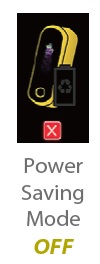
Q : I can not see animation screens, but it is working, what can I do?
A : Make sure the power saving mode is OFF 。
Q : I'm using a Pixel 6 Pro and a Pixel 10 Pro XL and can't connect two devices running Android 16 simultaneously. The first one connects, but the second one doesn't. What should I do?
A:
The Pixel 6 is not compatible with Pixel 6 or above models.
The Pixel 6 can only connect simultaneously with devices compatible with Pixel 6 or earlier models. The Pixel 6 must connect first before connecting to older devices.
Additionally, when connecting the Pixel 6 to an iPhone, the Pixel 6 must connect first before the iPhone.
When using two Pixel models, connect the newer model first, then connect the older model.
Q : About the “Auto-Catch new Pokémon ONLY/On and ONLY/Off” setting on the autocatcher. What does toggling on or off for this setting do exactly?
If I wanted it to catch only duplicates, would I turn this setting off or on? And if it doesn’t catch new Pokémon, will it notify me when I do come across a new Pokémon?
A : You can turn off Auto-Catch for new Pokémon.
If you encounter a new Pokémon, it will alert you and wait for you to manually press the button to catch it.
Q: Why won't my Pocket Auto Catch connect after the Pokémon GO update (e.g., version 0.415.1)? Can this be fixed with a firmware update?
A: This connection issue is highly likely caused by changes to the hardware identification mechanism introduced in the recent official game update by Niantic.
Since Brook's Pokémon series products (such as Pocket Auto Catch and Auto Catch Light) are designed based on the original 1st-generation "Pokémon GO Plus (teardrop shape)" hardware framework, this specific limitation cannot be resolved via a product firmware update.
Users will need to wait for an official compatibility fix or adjustment from Niantic in a future game update. In the meantime, we recommend trying the temporary workarounds below.
Step 1: Complete Bluetooth Connection Reset
-
System Settings: Go to your phone's "Settings" > "Bluetooth" and select "Forget this Device" for all devices named "Pokemon GO PLUS".
-
Restart Phone: Fully restart your smartphone.
-
Close Background Apps: Ensure that Brook companion apps (Pocket Center or Auto Catch Carry) are completely closed and not running in the background.
-
In-Game Reset: Open the Pokémon GO game, go to Settings > Connected Devices and Services > Accessory Devices, and tap the triangle icon (▲) next to any existing device to remove it.
-
Re-pair: Lightly press the button on your Brook device, check if a new device appears in the game's available devices list, and tap to reconnect.
Step 2: App Reinstallation or Downgrading (For Android)
-
Reinstall the Game: Uninstall and reinstall the game. For Samsung users, try downloading the game from both the "Galaxy Store" and "Google Play Store", as compatibility may vary between the two.
-
Sideload an Older APK (Android Only): If the latest version completely blocks the connection, you can try downloading the previously working version 0.413.2 APK from a trusted third-party platform (such as Uptodown APP Store) to manually install (sideload) it. If successful, remember to disable the "Auto-update apps" feature in your app store to prevent automatic updates.
-
Can't Find What You Need?
If none of the situations apply to you, contact your local distributors who will help you troubleshoot or fill out a technical support form so that we can help you find the best solution.



3F., No.121, Jian 8th Rd., Zhonghe Dist., New Taipei City 23585, Taiwan
Tel: +886-2-6620-2225 #361|Fax: +886-2-6620-2226|Business Hours: 10:00 AM to 6:00 PM (GMT+8)