-
Q1.Firmware Update - StarRay Controller
Q1: How do I update the firmware?
A: Follow the steps below:-
Download the updater from:
https://www.brookaccessory.com/tw/download/Controller/ -
Switch StarRay to PS5 mode
-
Connect the controller to your PC via USB, then run the updater
-
When the update completes successfully, you’re done
Q2: The updater won’t launch / can’t be executed. What should I do?
A: You may be missing the required driver.-
Download the driver from:
https://drive.google.com/file/d/1QjTE0gX_kjFJQalcl9a2jI_mSzM8Lim8/view?usp=sharing -
Place the downloaded driver into the updater program folder
-
Run the updater again and retry the update
-
-
Q2.Other Technical Questions - StarRay Controller
Q1: I connected the controller to PS5 via USB, but it won’t work / doesn’t seem registered.
A: After each wired connection, press the HOME button once to complete registration on PS5.Q2: The controller won’t connect / has no response.
A: Check the rear Platform Switch first. Make sure it’s set to the correct mode (PS5 or PC), then reconnect.Q3: No sound when I plug in a headset in wireless mode.
A: The 3.5mm headset jack works in wired mode only. Audio is not supported in wireless mode. Use a USB wired connection.Q4: My character keeps moving / buttons keep auto-firing.
A: You may have accidentally enabled Turbo or Macro Auto-Play, which can cause continuous input. Disable Turbo/Macro, or reset if it doesn’t stop.Q5: Buttons are mapped wrong / the controller behaves abnormally.
A: Use a pin (e.g., paper clip) to press the RESET hole on the back. After reset, reconnect the controller.Q6: Failed to update the firmware; the device is not functioning.
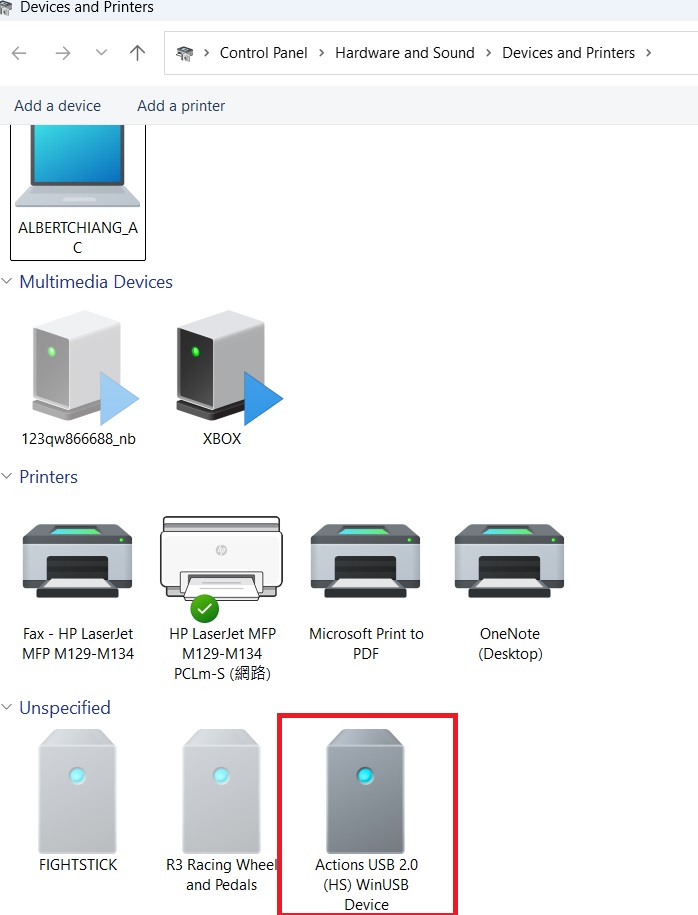
A: Use a pin (e.g., paper clip) to press the RESET hole on the back. Make sure the device “Actions USB 2.0 (HS) WinUSB " Device in Device and Printer.
Run the firmware update again.
https://drive.google.com/file/d/1bdHoBiBuzYhoMcNb76Rx2CuefK3ZqG4t/view?usp=drive_link
Can't Find What You Need?
If none of the situations apply to you, contact your local distributors who will help you troubleshoot or fill out a technical support form so that we can help you find the best solution.



3F., No.121, Jian 8th Rd., Zhonghe Dist., New Taipei City 23585, Taiwan
Tel: +886-2-6620-2225 #361|Fax: +886-2-6620-2226|Business Hours: 10:00 AM to 6:00 PM (GMT+8)