-
Q51.Defective - Wingman NS Lite
Q : My converter used to work perfectly, but now it doesn’t seem to work anymore, it seems to be defective.
Please try the troubleshooting methods as below:
1. Make sure you have followed a firmware update guide to do firmware update first.
2. Make sure the converter LED is on when it is plugged in Console/PC.
3. Switch another USB port and retry.
4. Use other fighting sticks/controllers and retry.
5. Switch to PS3 mode on fighting sticks and retry.
6. Connect the converter to PC with fighting sticks, then press buttons in Device and Printers, and make sureif it works.
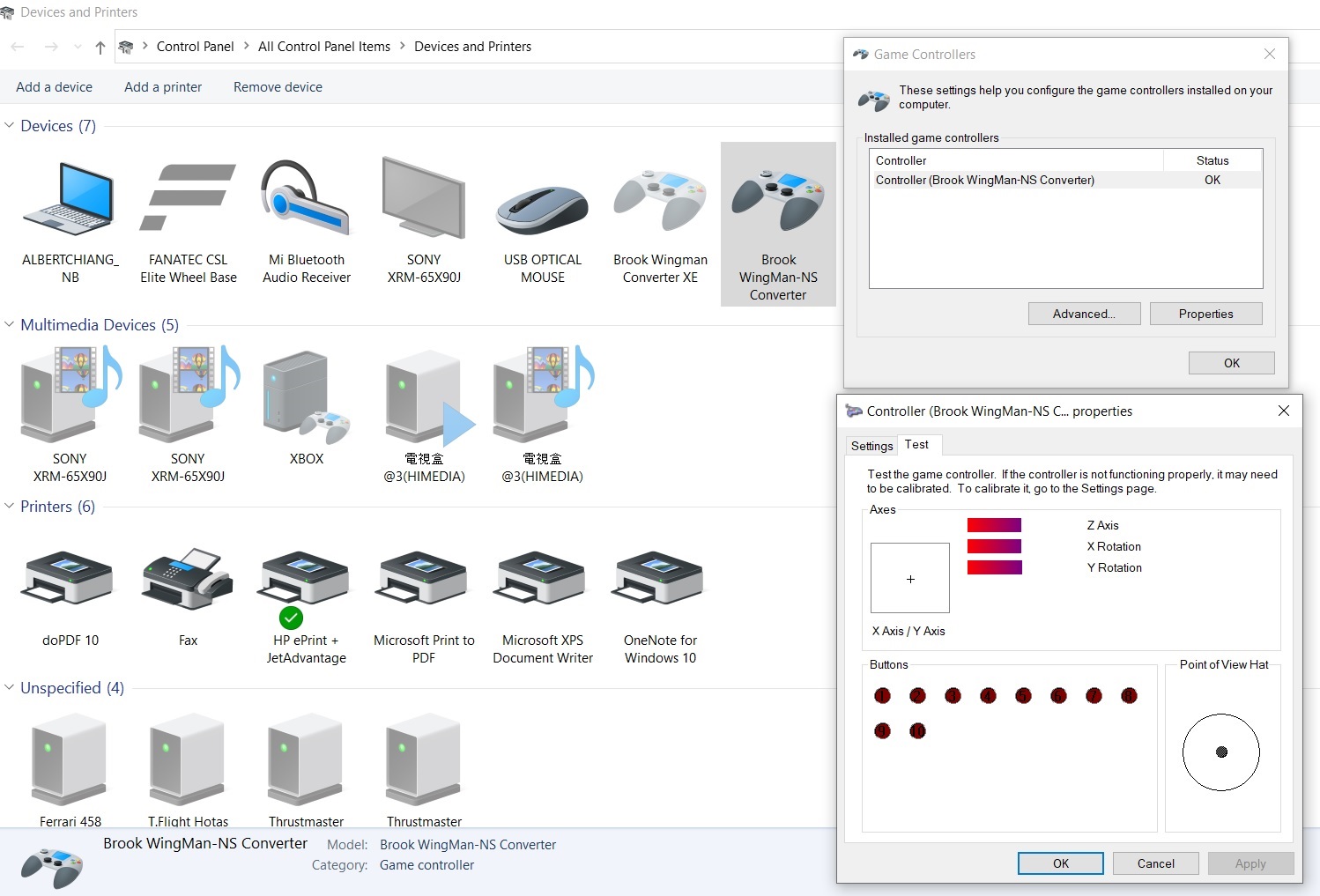
If it doesn't help, please contact your original place of purchase for assistance.
For further assistance, please log on to Brook's official website, go to“Contact us", and leave your message, we will contact you soon. -
Q52.Defective - Wingman FGC
Q : My converter used to work perfectly, but now it doesn’t seem to work anymore, it seems to be defective.
Please try the troubleshooting methods as below:
1. Make sure you have followed a firmware update guide to do firmware update first.
2. Make sure the converter LED is on when it is plugged in Console/PC.
3. Switch another USB port and retry.
4. Use other fighting sticks/controllers and retry.
5. Switch other mode (X360/PS3/PS4/PC) on fighting sticks and retry.
6. Connect the converter to PC with fighting sticks, then press buttons in Device and Printers, and make sureif it works.
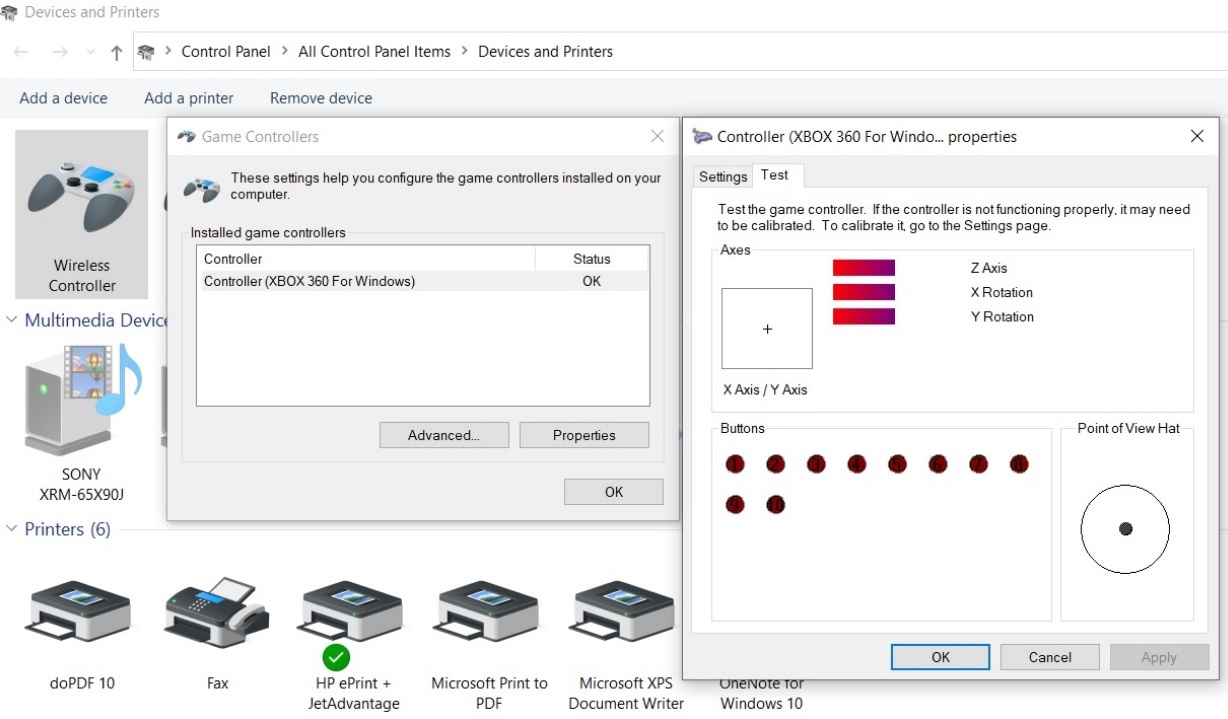
If it doesn't help, please contact your original place of purchase for assistance.
For further assistance, please log on to Brook's official website, go to“Contact us", and leave your message, we will contact you soon. -
Q53.Other Technical Questions - Wingman P5
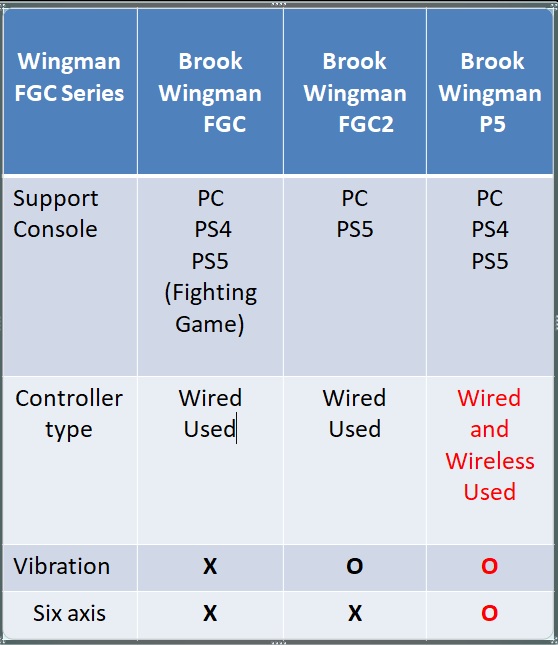
Q : What are the different function of Wingman PS5 compared to other Wingman FGC?
A :
Q : When i use a Sony Dualshock 4 on PS5, i can’t find the TOUCHPAD PRESSURE function when using it with PS5 games.
I tried L3+R3 but it doesn’t work, what can i do?A :
1.Turn on the the Touch Pad to mode1 and sync to settings to converter in Brook Converter Center.
Brook Converter Center :
https://www.brookaccessory.com/download/Setting_Tools/

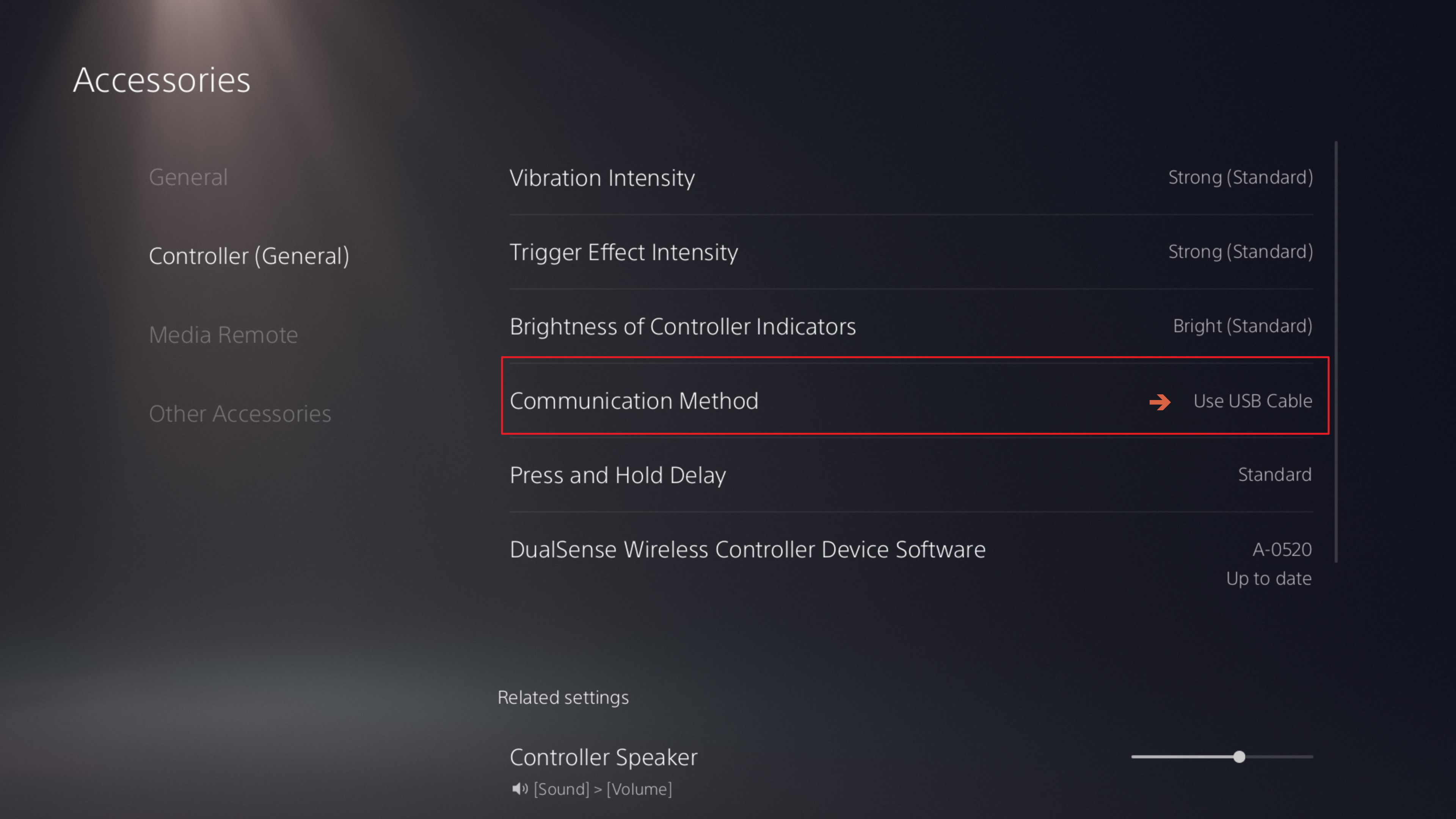
2. Set the Use USB Cable in PS5 settings.
Q : The adapter won't work when connected to my PS4. What should I do?
A : Switch to PS4 using manual mode
- Connect the adapter to your PC or game console, then press and hold PS + Right button for 3 seconds (PS4 Mode) .The Mode will be saved after switching.
1. PS + Up : PS5 Mode.
2. PS + Left : PC Mode.
3. PS + Right : PS4 Mode.
4. PS + Down : Auto Mode.Q: How can I manually and quickly clear Remap/Macro/Turbo and resolve touchpad TP key and controller no vibration ?
A: After connecting the controller to the Wingman P5, simultaneously press the corresponding Create + Option + PS buttons on the controller (about 2-3 seconds). The Wingman P5 will then light up yellow light, indicating that the settings have been reset.
Related video: https://youtube.com/shorts/bvPZ9QNZDmI
Q : While using it, the touch mode sometimes changes to mode 2. Hhow to change the touch mode directly on the controller?
A :
Manual switching mode:
View + LSB = Mode 1
View + RSB= Mode 2
Q: Why does my camera screen spin or drift in Apex Legends even when no controller is connected to the Wingman P5s?A: This behavior is caused by the specific game settings and deadzone mechanics of Apex Legends, rather than a hardware defect of the Wingman P5s.
How to Resolve:
-
Method 1 (Recommended): In the Apex Legends controller settings, slightly increase the "Look Deadzone" from "None" to a small value (e.g., "Small") until the camera stops drifting.
-
Method 2: If you prefer using Linear response curves, you can switch to "Advanced Look Controls (ALC)" and manually adjust the deadzone value slightly above 0 to stabilize the neutral center without compromising your aiming precision.
Q : My PS4 controller suddenly stopped pairing wirelessly via the adapter , What should I do?
- A: Please first re-pair your PS4 controller with your PS4 console wirelessly (reset the PS4 controller’s Bluetooth). Once that’s done, pair it wirelessly with the Wingman P5. Make sure your PS4 controller is fully charged.
-
-
Q54.Other Technical Questions - Wingman FGC Retro
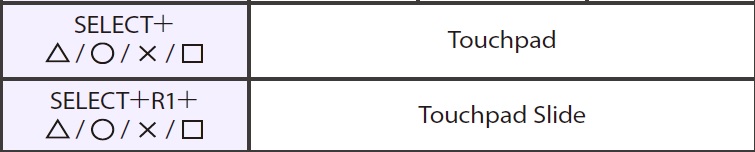
Q : Don't know what button combination is used on SF6 on PS5 for touchpad to use in practice, what can i do ?
A :
Q : I can't use my controller or fighting stick on my PS5. What can I do?
A :
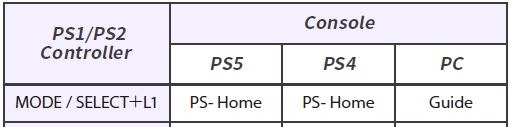
Update the Wingman FGC Retro adapter firmware and make sure to press the PS ( Select + L1) button to log in to PS5.
-
Q55.Other Technical Questions - Wingman FGC 2
Q : Does it support to use on PS5?
A : Yes, it's for all games on PS5 only.
Q : What's the difference between FGC 2 and FGC?
A : FGC allows gamers to play fighting games on PS5.
Wingman FGC 2 enables playing PS5 fighting games with 3rd party wired fight sticks.Q : When I connect ZEOP-PI board to Wingman FGC 2 , the R2 and L2 buttons does not work, what can I do?
A : Switch to PS3 / X-input mode on Zero-Pi and retry.
1P : PS3
2P: X-inputQ : When I connect Qanba Q4 RAF to Wingman FGC 2 , the Qanba Q4 stick does not work, what can I do?
A :
1. Set to Xbox360 mode on qanba q4.
2. Connect Qanba Q4 to Wingman FGC 2.
3. Connect Wingman FGC 2 with Qanba Q4 to PS5.
3. The Wingman LED and Qanba Q4 LED1 are turn on Blue.
4. Press PS (Home) button to login PS5.
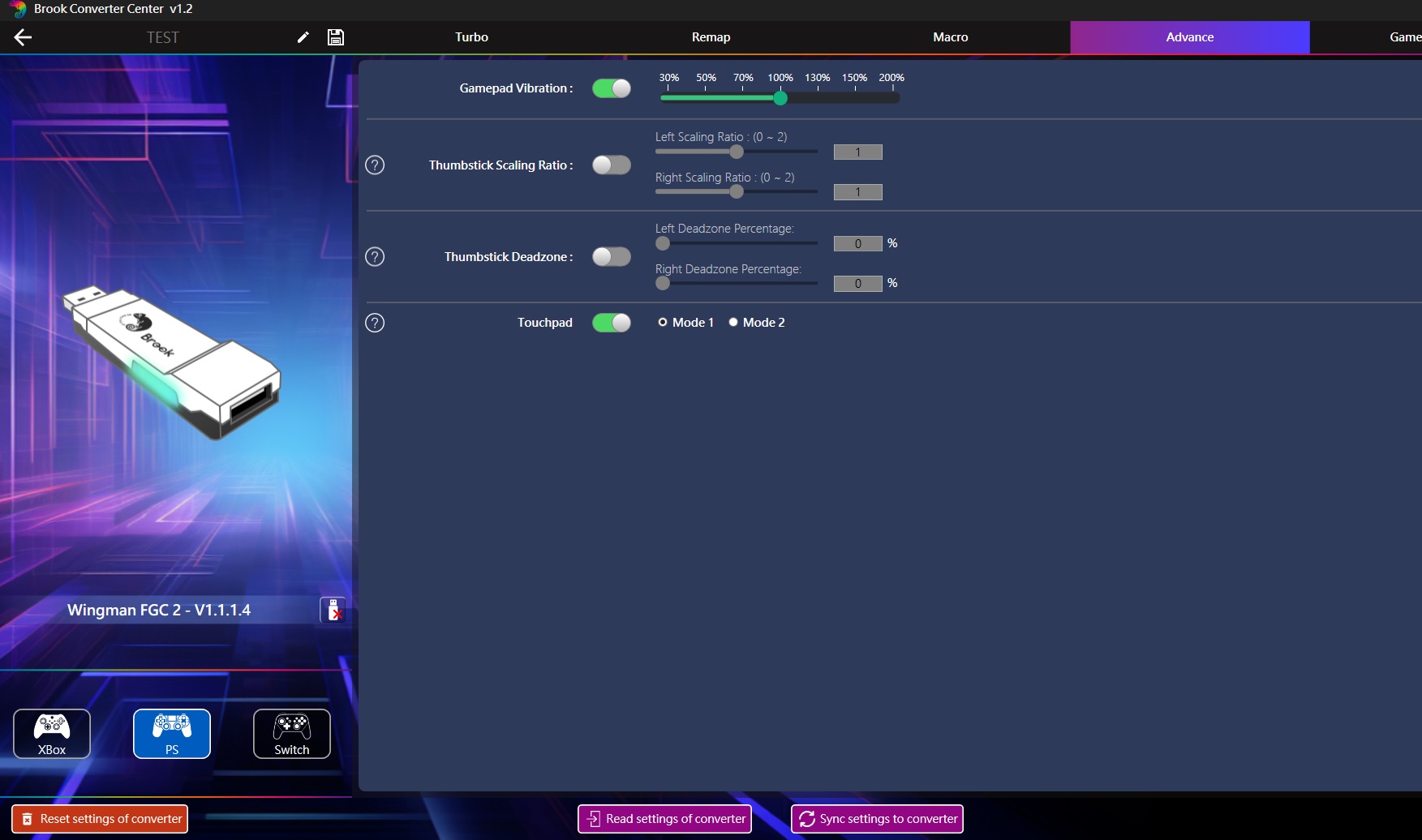
Q : The converter the touchpad feature worked fine as I would press select and it would act as touchpad, but now after updating the feature has gone to it being the share button , what can i do?
A :
Update the firmware and enter the Brook APP to set the Touchpad to model 1.
Touchpad Mode 1 is for Street Fighter 6 to enable the view button to be used in the controller setting.
Touchpad Mode 2 is for in Ghost of Tsushima ,this mode needs two buttons (View + RSB) pressed at the same time to trigger the Touchpad Key.Firmware:
https://www.brookaccessory.com/BrookUpdate/update.html?device=wm_series
Brook Converter Center :
https://www.brookaccessory.com/library/dl_file.php?catname=Setting_Tools&id=324&type=2&dir=download
Q : Does it work with the tankstick?
A :
It's compatible with tankstick, and need to X-Arcade Playstation 3 + Original Xbox Adapter (PS3 mode).
https://shop.xgaming.com/products/x-arcade-playstation-3-xbox-1-adapter-2in1
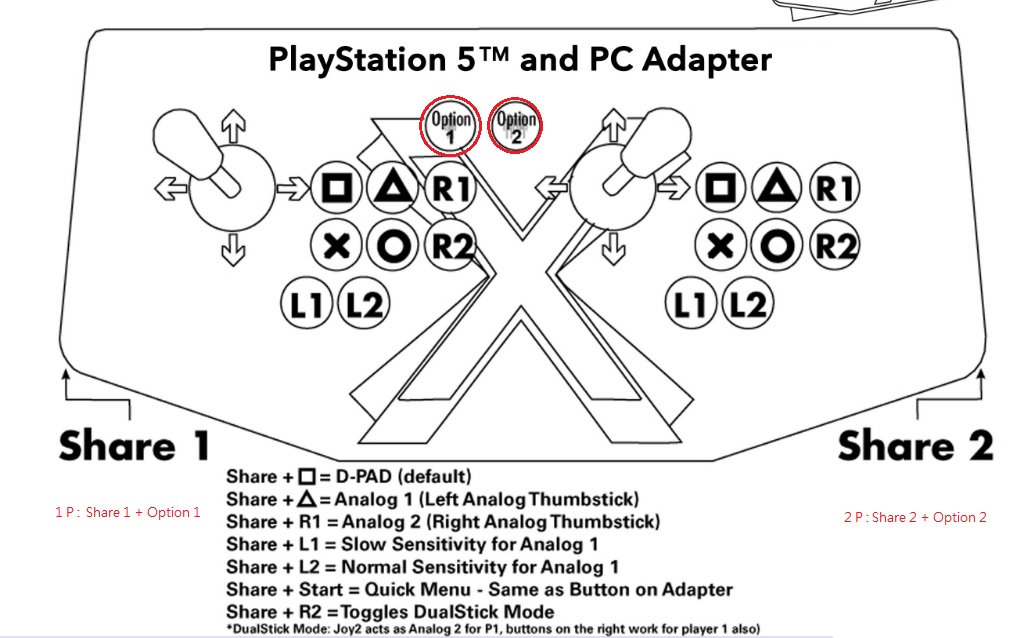
Q: Using 2x Wingman FGC2 with on the X-Arcade Tankstick with the 2-in 1 X-Adapter and I can't get two players to work , what can i do ?
A:
Hold and press Share button , then press Option button ( PS button )to login PS4 / PS5.
1P : Share 1 + Option 1
2P : Share 2 + Option 2
X-Arcade Layout and Instructions :
https://support.xgaming.com/support/solutions/articles/12000102164-playstation-5-pc-adapter-button-layout-and-instructions
Video :
https://drive.google.com/file/d/1MC6HU95Kclst3SBuy18xgFoG-jamt0Dv/view?usp=drive_link
Q : Would like to inquire why the FGC2 does not work via passthrough port of my controller (GP2040)?
A : Due to limit of hardware, the Wingman FGC 2 doesn’t support USB Passthrough function.
Q : Can I use PS Remote Play?
A: The Wingman FGC 2 doesn’t support PS Remove Play.
Q : The Wingman FGC2 does not work to use my Sega Astro City Mini Arcade Stick on the ps4/ps5 , what can i do ?
A: Please refer to the corresponding Buttons for Sega Astro City Mini Arcade Stick.
PS= Combo + O
Share = Combo + X
L2 = Combo + L1
R2 = Combo + R1
L3 = Combo + □
R3 = Combo + △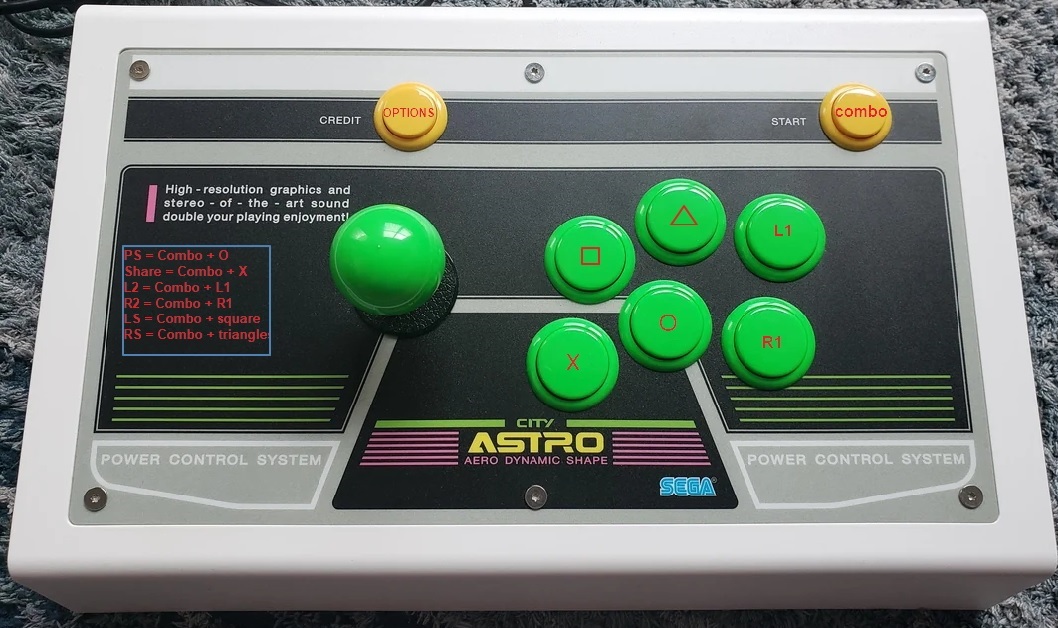
Q : When i use a Sony Dualshock 4 on PS5, i can’t find the TOUCHPAD PRESSURE function when using it with PS5 games.
I tried L3+R3 but it doesn’t work, what can i do?A :
1.Turn on the the Touch Pad to mode1 and sync to settings to converter in Brook Converter Center.
Brook Converter Center :
https://www.brookaccessory.com/download/Setting_Tools/2. Set the Use USB Cable in PS5 settings.
Q : My 8BitDo Arcade Controller still isn't working in 2.4G mode. What should I do?A:1. Turned on the 8BitDo Arcade Controller in 2.4G + X-Input mode.2. Held the green button until the LED blinked fast.3. Connected the 8BitDo 2.4G receiver to the Wingman FGC2.4. Connected the Wingman FGC2 to the PS5.5. Waited until both LEDs stopped blinking.6. Pressed the blue Home button.Q: The Wingman FGC2 and the product to be able to use a Quadstick controller on my ps5 but the wingman FGC2 won’t work ,What should I do?A:Refer to the Quadstick user manual and the FGC2 firmware version. -
Q56.Other Technical Questions - Wingman NS Lite
Q : What is the difference between the Wingman NS and the Wingman NS Lite?
A :
The Wingman NS Lite supports wireless XSX|S, Xbox Elite 2, and Xbox One S controllers and, unlike Wingman NS.
It also supports Macros and Multiple setting storage functions and 5-Level Turbo Settings.
Q : When I connect the converter to the Switch dock, and Switch suddenly shuts off with a black error screen
A : Before you connect the converter to the Switch dock, make sure you have turned on "Pro Controller Wired Communication" in System Settings on Switch.
B: Restart Switch and retry.
C: Switch another USB port and retry.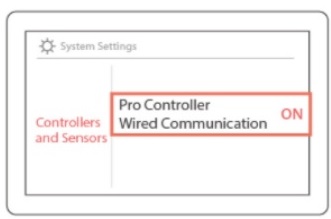
Q: I have an X-Arcade solo joystick. I would like to know if with the Brook Wingman NS Lite this joystick would work with a Nintendo Switch console?
A: The Wingman NS Lite is compatible with X-Arcade solo joystick.
-
Q57.Other Technical Questions - Wingman FGC
Q : Does it support to use on PS5?
A : Yes, it's for fighting games on PS5 only.
Q : What's the difference between this product and UFB-UP5?
A : UFB-UP5 is the upgrade kit for specific Brook fight sticks, it allows gamers to play fighting games on PS5.
Wingman FGC enables playing PS5 fighting games with 3rd party wired fight sticks.Q : When I connect ZEOP-PI board to Wingman FGC , the R2 and L2 buttons does not work, what can I do?
A : Switch to PS3 / X-input mode on Zero-Pi and retry.
1P : PS3
2P: X-inputQ : When I connect Qanba Q4 RAF to Wingman FGC , the Qanba Q4 stick does not work, what can I do?
A :
1. Set to Xbox360 mode on qanba q4.
2. Connect Qanba Q4 to Wingman FGC.
3. Connect Wingman FGC with Qanba Q4 to PS5.
3. The Wingman LED and Qanba Q4 LED1 are turn on Blue.
4. Press PS (Home) button to login PS5.Q : When I connected it to my PS5 and used the arcade controller with Street Fighter 6, the controller stopped responding and all buttons, If I unplug the converter and reconnect it, I can use it again, but after a few minutes the buttons stop working again, what can i do ?
A : Update firmware (V1.1.0.1).
Q : When I insert the converter into the PS5, the red LED lights up all the time. Is this the correct?
A :
Red LED : Tournament Version
Blue LED : Standard Version
Q : How to adjust the sensitivity/ analog deadzone on the controller?
A :
Enable/ disable 3DVR magnification
Select + Square (X) button : 3DVR magnification on
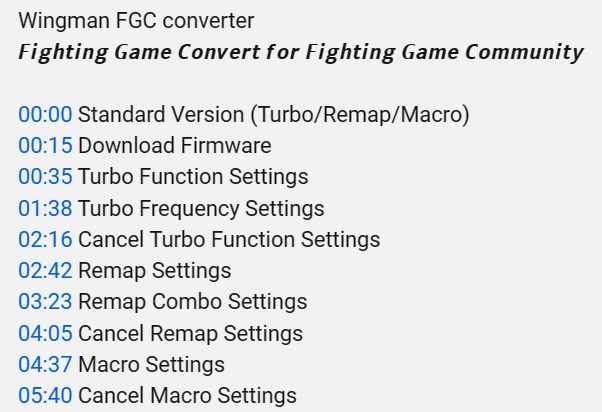
Select + Circle (B) button : 3DVR magnification offQ : How to do remap / turbo / Macro setting or cancel setting?
A : https://youtu.be/OEXEqsLPeNk
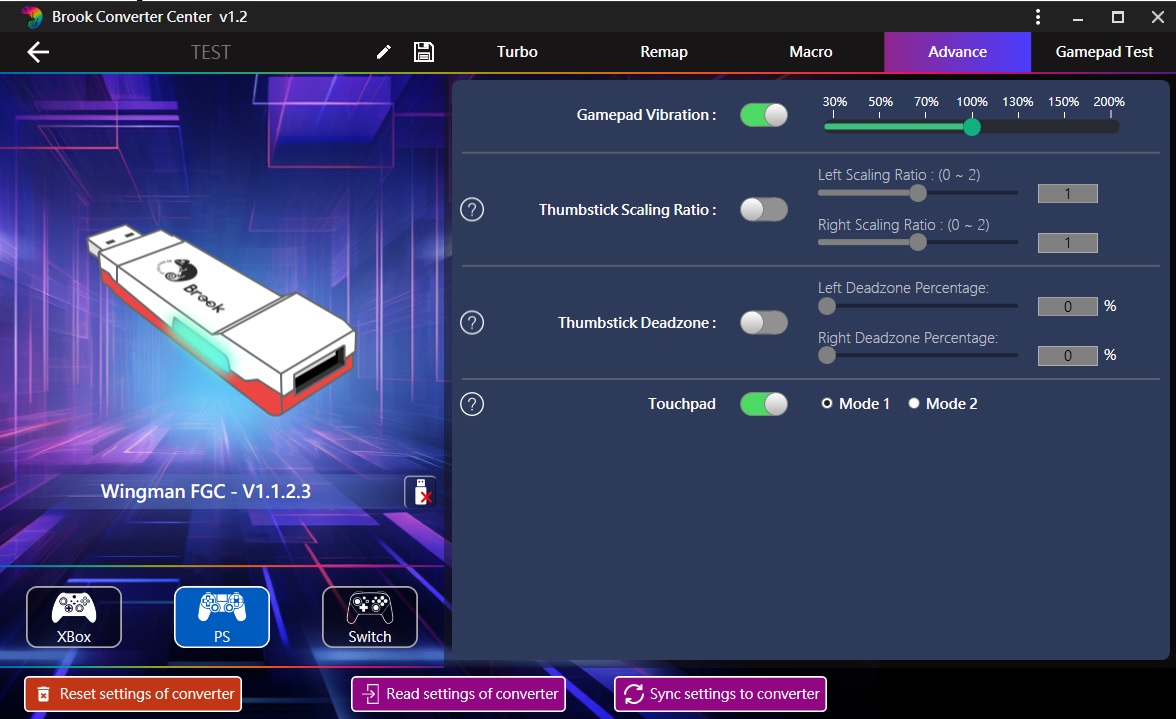
Q : The converter the touchpad feature worked fine as I would press select and it would act as touchpad, but now after updating the feature has gone to it being the share button , what can i do?
Update the firmware and enter the Brook APP to set the Touchpad to model 1.
Touchpad Mode 1 is for Street Fighter 6 to enable the view button to be used in the controller setting.
Touchpad Mode 2 is for in Ghost of Tsushima ,this mode needs two buttons (View + RSB) pressed at the same time to trigger the Touchpad Key.Firmware:
https://www.brookaccessory.com/BrookUpdate/update.html?device=wm_series
Brook Converter Center :
https://www.brookaccessory.com/library/dl_file.php?catname=Setting_Tools&id=324&type=2&dir=download
Q : Does it work with the tankstick?
A :
It's compatible with tankstick, and need to X-Arcade Playstation 3 + Original Xbox Adapter (PS3 mode).
https://shop.xgaming.com/products/x-arcade-playstation-3-xbox-1-adapter-2in1
Q, Using 2x Wingman FGC with on the X-Arcade Tankstick with the 2-in 1 X-Adapter and I can't get two players to work , what can i do ?
A:
Hold and press Share button , then press Option button ( PS button )to login PS4 / PS5.
1P : Share 1 + Option 1
2P : Share 2 + Option 2
X-Arcade Layout and Instructions :
https://support.xgaming.com/support/solutions/articles/12000102164-playstation-5-pc-adapter-button-layout-and-instructions
Video:
https://drive.google.com/file/d/1MC6HU95Kclst3SBuy18xgFoG-jamt0Dv/view?usp=drive_link
-
Q58.Order & Support Guide - Wingman NS Lite
Q: My package is delayed, or it wasn't delivered to the correct location?
A: To provide the fastest delivery service, your order is fulfilled and delivered by Amazon Official (FBA).
-
What to do: If the delivery progress is abnormal or the location is incorrect, we recommend contacting Amazon Official Customer Service first for the most immediate updates.
-
Further Assistance: If you need any order details or further assistance from us during your communication with Amazon, please feel free to contact us.
Q: What if I have questions about product functions or receive a damaged/incomplete item?
A: Every product undergoes a strict quality inspection and sign-off process before entering the warehouse to ensure full functionality.
-
Troubleshooting Support: If you have any questions regarding operation, please refer to our Product FAQ or contact our FAE technical support team directly for assistance.
-
After-Sales Service: If the product is damaged or missing parts, please inform us via "Contact Seller". We promise to respond within 24 hours and assist you through the official Amazon replacement or return process.
-
Can't Find What You Need?
If none of the situations apply to you, contact your local distributors who will help you troubleshoot or fill out a technical support form so that we can help you find the best solution.



3F., No.121, Jian 8th Rd., Zhonghe Dist., New Taipei City 23585, Taiwan
Tel: +886-2-6620-2225 #361|Fax: +886-2-6620-2226|Business Hours: 10:00 AM to 6:00 PM (GMT+8)