-
Q1.Compatibility - Wingman P5s
Q: How do I know if the converter is compatible with my stick ?
A : Before purchase, you can log on to Brook’s official website to see if your controller/stick is listed in the compatibility list. Compatibility list is in the product introduction page.
The list indicates the stick that have been tested to be compatible with the converter.
For those controller/stick which are not listed may be incompatible or not be tested yet.
You can go to Contact us for assistance or suggestion.
Or, you may search over the internet for other players’experience.
Q : My stick is listed as compatible in the compatibility list, but there's no respone when I use it.
A : Connect Wingman P5 to other USB port.
B : Switch to other (PS3/PS4/X-Input) or 2.4 G dongle (X-Input) mode on controller and retry.C : Try to do firmware update on both converter and controller.
D : Use other controller to see if the situation persists.If it doesn't help, please contact us for further assistance.
-
Q2.General - Wingman XB 3
Q: What are the differences between Wingman XB 2 and Wingman XB 3?
Ans: Wingman XB 2 is compatible with Xbox 360 and Xbox Original consoles; Wingman XB 3 is compatible with Xbox One and Xbox Series X|S consoles
Q : In the xbox dashboard, when press the right trigger with Vader 4 Pro controller, it will make the page scroll down twice/double click , what can i do ?
Ans :
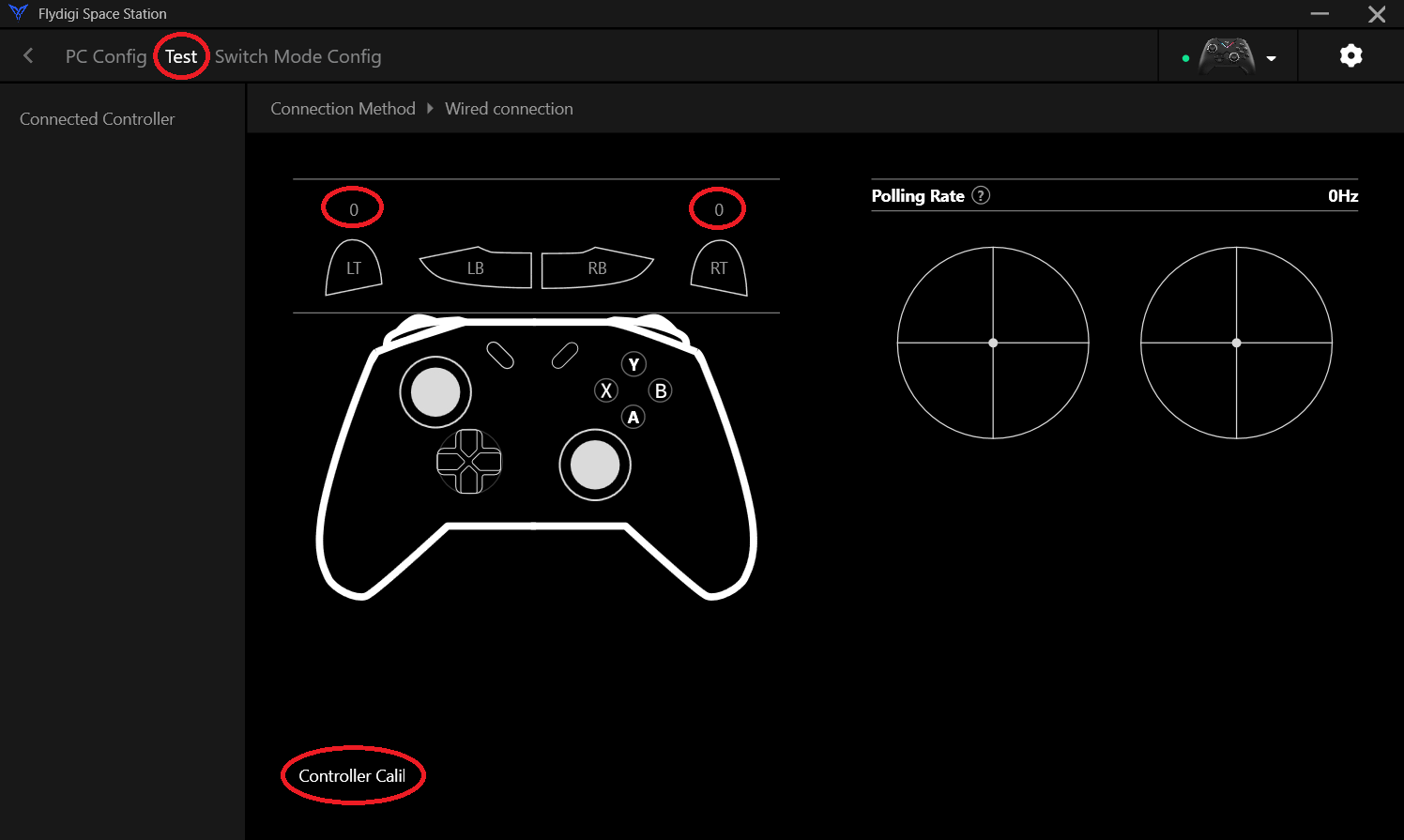
Please follow the steps below to test.
1. Set PC mode on Vader 4 Pro controller, then connect the Vader 4 Pro controller to a PC.
2. Download the Vader 4 Pro controller APP
https://www.xincing.com/page/FDG.download
3. Run the APP, then press RT and LT button in TEST in Test Options
4. Make sure the value is slowing up from 0, 1, 2.. to 255.
5. If the value is direct 0-255, you need to calibrate the controller.
https://drive.google.com/file/d/19Sr78h0N5u9wVlBOA9x7yJXsbqfeXyy9/view?usp=drive_link
5. In the xbox dashboard ,then test it again. -
Q3.Compatibility - Wingman XE 2
Q: How do I know if the converter is compatible with my stick ?
A : Before purchase, you can log on to Brook’s official website to see if your controller/stick is listed in the compatibility list. Compatibility list is in the product introduction page.
For those controller/stick which are not listed may be incompatible or not be tested yet.
Or, you may search over the internet for other players’ experience.
Q : My controller/stick is listed as compatible in the compatibility list, but there's no respone when I use it.
A : Connect converter to other USB port.
B : Switch to other (X360/PS3/PS4/PC) mode on stick and retry.
C : Try to do firmware update.
D : Use other fighting sticks/controller to see if usb port works.If it doesn't help, please contact us for further assistance.
Q : I can't use my converter with my racing wheel, how can I do?
For using racing wheel, Ras1ution may be good for you.
-
Q4.Compatibility - Wingman XB 2
Q: What are the differences between Wingman XB 2 and Wingman XB 3?
Ans: Wingman XB 2 is compatible with Xbox 360 and Xbox Original consoles; Wingman XB 3 is compatible with Xbox One and Xbox Series X|S consoles
Q: How do I know if the converter is compatible with my stick ?
Ans: Before purchase, you can log on to Brook's official website to see if your controller/stick is listed in the compatibility list.
Compatibility list is in the product introduction page.For those controller/stick which are not listed may be incompatible or not be tested yet.
Or, you may search over the internet for other player's experience.Q : My controller/stick is listed as compatible in the compatibility list, but there's no respone when I use it.
A : Connect converter to other USB port.
B : Switch to other (X360/PS3/PS4/PC) mode on stick and retry.
C : Try to do firmware update.
D : Use other fighting sticks/controller to see if theusb port works.If it doesn't help, please contact us for further assistance.
Q : I can't use my converter with my racing wheel, how can I do?
Ans: For using racing wheel, Ras1ution may be good for you: https://www.brookaccessory.com/detail/88228620
-
Q5.Compatibility - Wingman PS2
Q : How do I know if the converter is compatible with my controller/stick ?
A : Before purchase, you can log on to Brook’s official website to see if your controller/stick is listed in the compatibility list. Compatibility list is in the product introduction page.
The list indicates the controller/stick that have been tested to be compatible with the converter.
For those controller/stick which are not listed may be incompatible or not be tested yet.
You can go to Contact us for assistance or suggestion.
Or, you may search over the internet for other players’ experience.
Q : My controller/stick is listed as compatible in the compatibility list, but there's no respone when I use it.
A : Connect Wingman PS2 to other USB port.
B : Please try to do firmware update.
C : Use other sticks to see if the situation persists.If it doesn't help, please contact us for further assistance.
-
Q6.Compatibility - Wingman SNES
A : Before purchase, you can log on to Brook’s official website to see if your controller/stick is listed in the compatibility list. Compatibility list is in the product introduction page.
For those controller/stick which are not listed may be incompatible or not be tested yet.
Or, you may search over the internet for other players’ experience.
Q : My controller/stick is listed as compatible in the compatibility list, but there's no respone when I use it.
If it doesn't help, please contact us for further assistance.
Q : I can't use my converter with my racing wheel, how can I do?
For using racing wheel, Ras1ution may be good for you.
-
Q7.Compatibility - Wingman SD
Q: How do I know if the converter is compatible with my stick ?
A : Before purchase, you can log on to Brook’s official website to see if your controller/stick is listed in the compatibility list. Compatibility list is in the product introduction page.
For those controller/stick which are not listed may be incompatible or not be tested yet.
Or, you may search over the internet for other players’ experience.
Q : My controller/stick is listed as compatible in the compatibility list, but there's no respone when I use it.
A : Connect converter to other USB port.
B : Switch to other (X360/PS3/PS4/PC) mode on stick and retry.
C : Try to do firmware update.
D : Use other fighting sticks/controller to see if theusb port works.If it doesn't help, please contact us for further assistance.
Q : I can't use my converter with my racing wheel, how can I do?
For using racing wheel, Ras1ution may be good for you: https://www.brookaccessory.com/detail/88228620
-
Q8.Compatibility - Wingman NS
Q: How do I know if the converter is compatible with my stick ?
A : Before purchase, you can log on to Brook’s official website to see if your controller/stick is listed in the compatibility list. Compatibility list is in the product introduction page.
For those controller/stick which are not listed may be incompatible or not be tested yet.
Or, you may search over the internet for other players’ experience.
Q : My controller/stick is listed as compatible in the compatibility list, but there's no respone when I use it.
A : Connect converter to other USB port.
B : Switch to other (X360/PS3/PS4/PC) mode on stick and retry.
C : Try to do firmware update.
D : Use other fighting sticks/controller to see if theusb port works.If it doesn't help, please contact us for further assistance.
Q : I can't use my converter with my racing wheel, how can I do?
For using racing wheel, Ras1ution may be good for you: https://www.brookaccessory.com/detail/88228620
-
Q9.Compatibility - Wingman XB
Q: How do I know if the converter is compatible with my stick ?
A : Before purchase, you can log on to Brook’s official website to see if your controller/stick is listed in the compatibility list. Compatibility list is in the product introduction page.
For those controller/stick which are not listed may be incompatible or not be tested yet.
Or, you may search over the internet for other players’ experience.
Q : My controller/stick is listed as compatible in the compatibility list, but there's no respone when I use it.
A : Connect converter to other USB port.
B : Switch to other (X360/PS3/PS4/PC) mode on stick and retry.
C : Try to do firmware update.
D : Use other fighting sticks/controller to see if theusb port works.If it doesn't help, please contact us for further assistance.
Q : I can't use my converter with my racing wheel, how can I do?
For using racing wheel, Ras1ution may be good for you: https://www.brookaccessory.com/detail/88228620
-
Q10.Compatibility - Wingman XE
Q: How do I know if the converter is compatible with my stick ?
A : Before purchase, you can log on to Brook’s official website to see if your controller/stick is listed in the compatibility list. Compatibility list is in the product introduction page.
For those controller/stick which are not listed may be incompatible or not be tested yet.
Or, you may search over the internet for other players’ experience.
Q : My controller/stick is listed as compatible in the compatibility list, but there's no respone when I use it.
A :
a : Connect converter to other USB port.
b : Switch to other (X360/PS3/PS4/PC) mode on stick and retry.
c : Try to do firmware update.
d : Use other fighting sticks/controller to see if usb port works.If it doesn't help, please contact us for further assistance.
Q : I can't use my converter with my racing wheel, how can I do?
For using racing wheel, Ras1ution may be good for you.
Can't Find What You Need?
If none of the situations apply to you, contact your local distributors who will help you troubleshoot or fill out a technical support form so that we can help you find the best solution.



3F., No.121, Jian 8th Rd., Zhonghe Dist., New Taipei City 23585, Taiwan
Tel: +886-2-6620-2225 #361|Fax: +886-2-6620-2226|Business Hours: 10:00 AM to 6:00 PM (GMT+8)